| |
Music Editing Master
Ideal and efficient audio editing & music enhancing software for home users
|
|
|
|
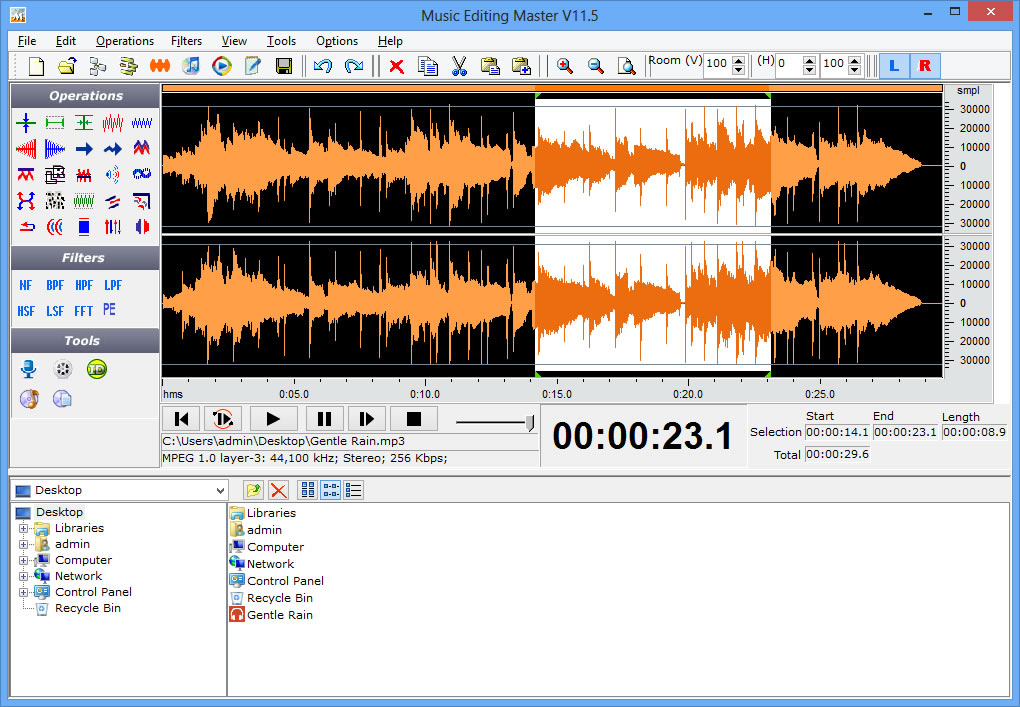
Music Editing Master is an ideal and efficient audio editing software for home users. It provides powerful and user-friendly editing environment which suits beginners especially. If you want to edit music visually and nondestructively, record audio visually, apply cool effects and filters, convert audio formats within all popular formats, merge audio with video and burn songs to CD or DVD, it satisfies all you needs. |
FEATURES
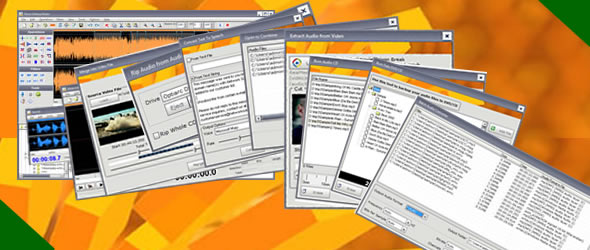
+ Edit audio nondestructively for quick and easy changes with unlimited undo/redo (Cut, Copy, Delete ,Delete Silence, Paste, Paste From File, Mix, Mix From File)
+ Open a number of audio files at the same time and combine them
+ Extract audio from video files (support split-extracting)
+ Rip audio from audio CD (support ripping whole CD as one track)
+ Convert text to speech
+ Merge audio into video file
+ Polish audio with advanced editing and cool effects (Insert Silence, Delete Silence, Amplify +/-, Fade In/Out, Stretch +/-, Pitch Shift, Resample, Adjust stereo channels, Chorus, Delay, Flanger,Invert, Noise, Normalize, Phaser, Reverberate, Reverse, Vibrato, Compressor, Expander)
+ Record audio from microphone, sound card or other input devices (You can record audio from DVD / VCD / CD Player, MP3 Player, RealPlayer, Windows Media Player, Web Page, Internet Conversation, Internet News, Internet Radio Station and more.) (You can listen to the current audio data while recording.)
+ Apply professional filters (BandPass Filter, FFT Filter, HighPass Filter, HighShelf Filter,LowPass Filter, LowShelf Filter, Notch Filter, Peak EQ Filter)
+ Burn audio CD so you can play it on your stand-alone CD player
+ Burn audio files to data DVD/CD to backup them or burn MP3 files so that you can play it on your stand-alone MP3 player
+ Drag-and-drop to load audio files or load audio from built-in file folder directly.
+ Powerful batch audio format conversion tool with detailed options
+ Convert between male voice and female voice
+ Use marker to locate the selected part or special part of the audio data and save them separately
+ Insert and change information about audio file (Album, Artist, Channels, Comments, Copyright, Genre, Title, Year and more)
Music Editing Master works with all audio formats.

 |
|
Here's some sweet music for your ears, if not for your eyes. Music Editing Master is a flexible and highly functional music-editing program. It has all the standard music-editing features, including invert, normalize, fade in and out, reverse, and reverberate. The interface is much more straightforward than in past versions, and most functions are just a button-click away. Beginners should find Music Editing Master easier to use than most of its competitors. The free trial provides ample opportunity to take this editing application for a spin. Overall, Music Editing Master is a good tool for mix masters and music fans looking to create their own home studio. |
|
|
|
|
Edit music from the comfort of your home
Music Editing Master is a handy audio editing and production tool, providing a powerful and user-friendly platform on which to make music. The application is perfect for editing music visually and non-destructively, recording music visually, applying cool effects and filters, converting audio formats within all the popular formats and burning songs to CD or DVD. |
|
|
|
|
Music Editing Master: Music that Warms Your Heart
If one fine day you come up with a brilliant idea to record your very own clip or just borrow the theme for it from a movie you liked, chances are you will be disappointed to find out that your operating system does not have any software for editing audio records, not to mention the rest. So, would you just give up your dream? — No way: fight for it and get an audio editor from a more attentive vendor.
Take a look at Music Editing Master — a friendly and powerful application for editing audio records, cutting out unnecessary pieces, mixing multiple tracks, applying special effects, etc., recording audio through microphone or line-in channel, grabbing audio content from movies, converting audio files form and to the majority of audio formats and burn the result on disk without involving external software, and a lot more. Certainly, such extensive list of functions doesn’t contribute to squeezing the application’s size; nevertheless, the software doesn’t take much time to get along with. To get started, you can simply drop the files (any number of files) you need to process onto the application window and start editing them. Besides the actual sound, you can edit the properties of the output file: album, artist, comments, genre, title, etc. With a collection of advanced sound effects and professional filters, you can quickly improve your record, and when the output is ready — save it to the format you like or... insert it into a movie and create your own video clip.
With Music Editing Master application can easily convert an audio file from one format to another — one by one or a whole series of files, using the batch conversion function...
Well, converting between audio formats is no longer a novelty. How about converting text to speech and recording the speech to an audio file? — Music Editing Master can do that too, and still has a lot to offer. |
|
|
 |
|
I genuinely LOVE your Music Editing Master and have found it far superior to Audacity or anything else out there that I have tried -- Joseph B, USA
MEM is the single most important tool that we use to edit our interview recording . I don't know what we would do without it..... -- Terry R, USA
I absolutely love this software it came in so handy when I had to stitch some music files together to make the ceremonial music for my sister's wedding last summer. Stitching the file together so that we had one long continuous sound track instead of gaps of silence in between was so much nicer. I also used it on a school assignment for my son. This software is awesome. -- Matthew D, USA
As a new client, I used MEM for our recent telephone conference for the first time and were extremely pleased with it...without this software it would have been very labor intensive! -- Linda P, USA
I really enjoyed this product for cutting my music for my dance team. -- Greg E, UK
Thank you. I love the software. Not only do I record my music but download satellite radio music and store. too cool. -- Robert P, USA
I work with Music Editing Master both at home and at work; This software is much much easier to use for cutting music and adding special effects -- Alain T, FR
I am quite happy with this product. I am a dance teacher and love using this to edit music for my recitals. -- Alissa K, USA |
|
| |
|
|
|
|
|
|